


PEEP Uses Chrome and Edge Extensions for Host Command Execution
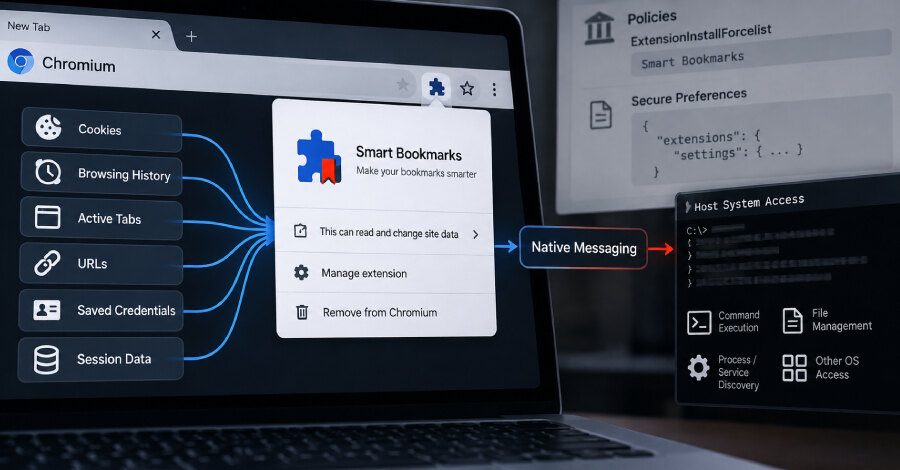
SOCRadar has disclosed PEEP, a Chromium-based post-compromise toolkit that masquerades as a bookmarks extension and can turn Google Chrome and Microsoft Edge into persistent backdoors for host command execution. The extension, presented as Smart Bookmarks with ID ejkndncpkdcjcikfhiamcdehdoegilbj, polls its command-and-control infrastructure every 30 seconds over plaintext HTTP.
PEEP requires prior administrative access or code execution on a target machine; it does not provide an initial access vector. Its installer injects the extension directly into Chrome or Edge profiles and forges Chromium Secure Preferences integrity values, bypassing Chrome Web Store checks and user prompts.
From browser extension to host-level access
The extension is the principal agent. It polls the /api/commands endpoint, harvests browser data, receives tasks, and returns results. It can collect browsing history, active-tab metadata, cookies, session data, active URLs, public IP addresses, locale and time-zone information.
Browser-side tasks include screenshots, clipboard access and JavaScript injection. When a task needs operating-system access, the extension invokes a Native Messaging Host executable named nm_host.exe. Operating in the user context, that bridge can run shell commands, manage files, and discover processes and services, extending the tool beyond browser monitoring and credential theft.
The browser-memory exposure described in browser memory credential exposure highlights why credentials and sessions held by browser processes deserve scrutiny, while PEEP adds a native bridge for command execution and file operations. SOCRadar said the toolkit runs inside the signed browser process, allowing the browser to become an endpoint pivot for session abuse, credential theft and host access.
Persistence mechanisms and infrastructure
PEEP uses several persistence routes: sideloading, enterprise force-install policies, Secure Preferences manipulation and a ScriptCache fallback. Its PowerShell components include install_silent.ps1, which enables Developer Mode; patch_secure_prefs.ps1, which modifies Secure Preferences; and force_enable.ps1, which removes the extension from external uninstalls, places a CRX under %LOCALAPPDATA%PEEPcrx, registers it through the HKCU Extensions key and an External Extensions JSON manifest, then restarts the browser.
A Python file named patch_secure_prefs_linux.py indicates that the operator is replicating this behaviour for Linux. PEEP also includes registration, heartbeat, update, task-result and exfiltration endpoints. SOCRadar observed a health endpoint reporting 34 agent entries, 10 active sessions and 507 data records, but said those records cannot be reliably separated into test entries, verified deployments or infected hosts.
What organisations should examine
The activity is unattributed, although SOCRadar found Chinese-language artefacts in the source code. PEEP is derived from the open-source RedExt browser-analysis and red-teaming framework, but adds installation routines, telemetry, an update channel, a native host bridge and a broader command set.
For security teams, the practical implication is to investigate unexpected extension force-install policies, changes to Secure Preferences, unfamiliar external-extension manifests and Native Messaging Host registrations alongside browser telemetry. These checks can help identify browser-based persistence after an endpoint compromise.