


Researchers demonstrate Windows 11 SYSTEM takeover through USB auto-install
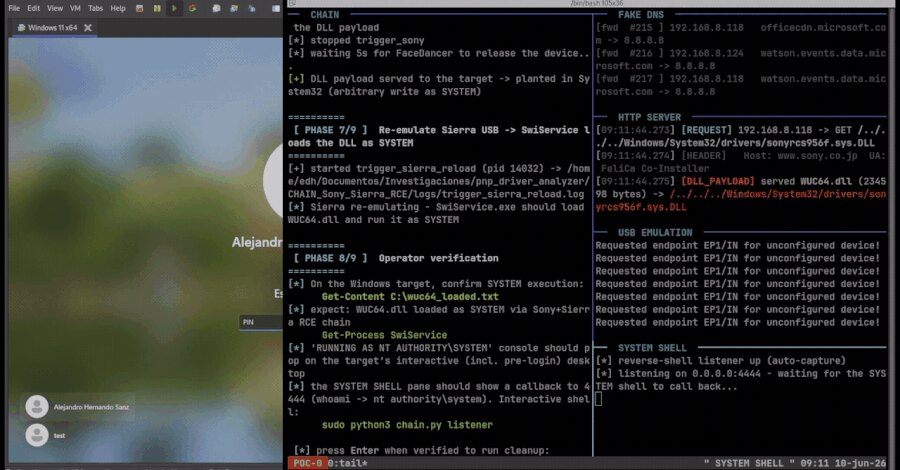
Security researchers Alejandro Hernando and Borja Martinez have demonstrated a technique that abuses Windows Plug and Play auto-installation to obtain SYSTEM code execution on a fully updated Windows 11 machine. Their research, titled Plug And Pwn: Weaponizing Windows PnP Auto-Install, was prepared for DEF CON 34 and combines Windows device installation with weaknesses in signed third-party software packages.
The researchers built tooling that emulates arbitrary USB devices. Windows receives a device's hardware and compatible IDs, searches for a matching driver package, and can run privileged installation components. Under the conditions described by the researchers, an unprivileged user can turn that process into SYSTEM-level execution.
Physical USB chain combines two vendor packages
In the physical demonstration, the researchers emulate a Sierra Wireless device, causing Windows to install SwiService.exe. The service runs as SYSTEM and exposes a SetDNS primitive, which the researchers use to redirect DNS resolution.
They then emulate a Sony FeliCa reader. Its co-installer retrieves configuration files over plaintext HTTP and derives local file names from URL paths. The researchers report that a path-traversal flaw can be used to place a DLL in System32. When the Sierra device is reconnected, SwiService.exe loads the planted DLL, resulting in SYSTEM execution.
The finding is not a blanket claim about every Windows release. The disclosed proof of concept used a fully updated Windows 11 system, and the vendor-specific mechanics involving Sierra Wireless and Sony software remain researcher findings unless independently confirmed by the vendors.
RDP route depends on enabled redirection
The same Plug and Play path can also be invoked remotely through Remote Desktop Protocol when supported Plug and Play or low-level USB redirection is enabled. The researchers' Python client forges a USB identity and presents a phantom Intel RealSense device, prompting Windows to use the redirected device-installation flow.
They say RealSense software can then be abused through a CRYPTBASE.dll search-order hijack in a user-writable installation directory, allowing an authenticated low-privilege user to obtain SYSTEM code execution. Microsoft documents that redirected low-level USB peripherals use the same driver-installation process as a physical Windows computer.
That remote path is configuration-dependent. Microsoft states that Remote Desktop Services does not allow supported Plug and Play and RemoteFX USB redirection by default, and Plug and Play redirection must be enabled before low-level USB forwarding can work. The broader pattern of trusted components becoming an attack path also appears in trusted components becoming an attack path, where security teams must assess the controls around privileged software rather than its signature alone.
Business implication
Administrators that do not require USB redirection can leave it disabled and use Windows device-installation restrictions to allow or block devices by hardware or compatible ID, device-instance ID, and setup class. Organisations should also review which signed driver packages and co-installers can reach endpoints, because the demonstrated chains rely on legitimate privileged installation paths combined with flaws in third-party packages.