


BigDiskBuster PoC targets Microsoft Defender update process
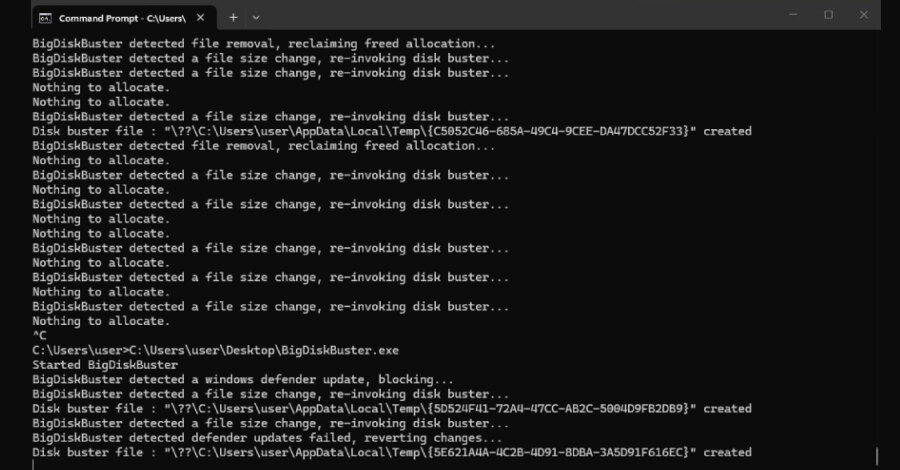
BigDiskBuster targets Defender update availability
A proof-of-concept tool named BigDiskBuster was published on GitHub on September 19 to prevent Microsoft Defender from installing platform and signature updates. The tool fills the remaining free space on the Windows C:\ drive when Defender begins an update, causing the update attempt to fail.
The publication has no CVE assignment, patch, or Microsoft advisory. Its author, Abdelhamid Naceri, is a former Microsoft security researcher. He says the code appears to work on all supported Windows versions, although no independent researcher has confirmed that claim.
Defender continues operating when an update is blocked, but its platform or detection content can become stale. A screenshot supplied by the author shows a generic Windows error during a Defender update attempt. The proof of concept does not establish whether Windows or Defender automatically raises an alert for the failure.
How the proof of concept operates
BigDiskBuster monitors the C: drive for new folders under Defender update paths. When it detects that Defender has started downloading a platform or definition update, it creates a hidden temporary file large enough to exhaust the available disk space. With no capacity left for the update directories to expand, the update fails.
After Defender removes its staging directory following the failed update, the tool deletes its temporary file and waits for a subsequent attempt. It also opens a handle on MRT.exe, the Windows Malicious Software Removal Tool, in a manner intended to prevent Windows Update from replacing that file.
Naceri described the tool as buggy and in need of rewriting. He compared it with UnDefend, a Defender denial-of-service issue disclosed in April. Microsoft fixed UnDefend in May as CVE-2026-45498 in Antimalware Platform version 4.18.26040.7.
A different update-blocking mechanism
UnDefend relied on uncontrolled resource consumption, whereas BigDiskBuster attempts to deny the update process disk capacity. The source does not establish whether the May fix also addresses this method, and the two techniques operate differently.
The author’s earlier Defender tools, BlueHammer, RedSun and UnDefend, were used in live intrusions before Microsoft issued patches. CISA subsequently added all three to its Known Exploited Vulnerabilities catalog. That history makes the absence of a current vendor workaround relevant to endpoint teams, while it does not independently validate BigDiskBuster’s claimed scope.
What endpoint teams can check now
Administrators can verify Defender status in Windows Security by opening Virus & threat protection, selecting Protection updates, and using Check for updates. In PowerShell, Get-MpComputerStatus reports the installed versions through the AMEngineVersion and AMProductVersion fields.
Teams can also investigate repeated Defender update failures, sustained low free space on the system volume, and unexpectedly large hidden files in temporary locations. Restricting unknown binaries with Windows Defender Application Control or AppLocker can limit the ability to run a tool of this type. The practical implication is to treat update health and system-volume capacity as endpoint security checks, rather than assuming a running Defender service is fully current.